
Pharmacy Management System Project in PHP with Source code
The pharmacy management system project in PHP using JavaScript bootstrap and CSS. it is very easy to operate and understand by the user. Talking about this system project, it only contains the admin sides. all the management of customer, medicine, purchase, sale, and supplier it's also done by the admin side.
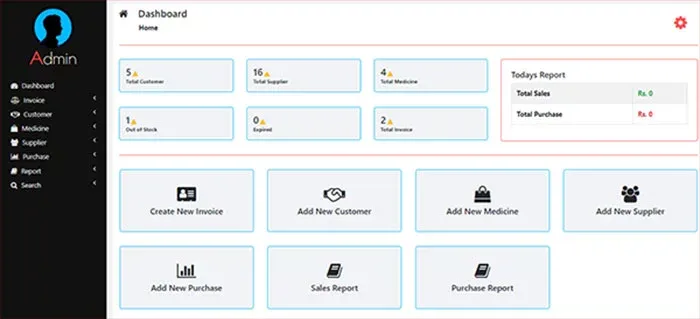
Pharmacy Management System in PHP with Full Source code
The pharmacy management system consists of PHP JavaScript and CSS. lets talking about this project. All management system is done from the admin, side, adding a customer to order medicine supply and collecting their record. The pharmacy management system in PHP has only a single agent agenda that is to allow the shop owner to maintain his business efficiently.
Features of the Pharmacy Inventory Management System
- Admin
- Dashboard
- Invoice
- Customer
- Medicine
- Supplier
- Purchase
- Report
- Search
Login Details
- Username: admin
- Password: admin123
How To Run Pharmacy Inventory Management System Project?
- Extract file
- Copy the main project folder
- Paste in xampp/htdocs/
- Open a browser and go to URL “http://localhost/phpmyadmin/”
- Then, click on the databases tab
- Create a database naming “pharmacy” and then click on the import tab
- Click on browse file and select “pharmacy.sql” file
- Click on go.
- Open a browser and go to URL “http://localhost/Pharmacy-Management/”

password and username not working
ReplyDeleteusername and password is not working.
Deletesend the docmentation also
Deletehow to add and delete product in manage existing stock? And where is sales table in db? too much errors
ReplyDeletehow to add and delete product in manage existing stock? and where is sales table in db?
ReplyDeleteSir how can I connect pup and a the sql
ReplyDeleteThank you for sharing this great post. erp software development company in chennai
ReplyDeleteThank you for sharing this great post. erp software development company in chennai
ReplyDeleteWith the web page you'll see identical text messages, generate what you may imagine. buy ketamine
ReplyDeleteUser name and password not working bro .Need username and password
ReplyDeleteusername and password not working
ReplyDeleteUsername or password invalid!
ReplyDelete